


Voucher creation from the order page: issue ACS shipments from order data, and close or delete vouchers from the admin.
ACS Courier for OpenCart - Shipping Automation and Checkout Rules
Connect your OpenCart store to ACS Courier for vouchers, label printing, tracking, ACS Store / Locker and SmartPoint flows, with shipping rules by zone, customer group, and cart.
- Voucher creation from the order page: issue ACS shipments from order data, and close or delete vouchers from the admin.
- Label printing on A4 or thermal printers, individually or in bulk for multiple orders in one PDF.
- Shipment tracking: store the tracking ID, show tracking links on an OpenCart page or the ACS site, and update order history comments and emails.
Introduction to the ACS Courier Plugin
The ACS Courier plugin for OpenCart simplifies ACS shipping operations in Greece and Cyprus by connecting the store to ACS Web Services for voucher creation from the order page, A4 or thermal label printing, bulk PDF printing, shipment tracking with tracking links, and ACS Store / Locker / SmartPoint flows where the checkout supports them.
Alongside the core shipping workflow, the plugin supports pricing and visibility rules for ACS checkout options: cost per delivery option, customer group, geo zone, cart value, and categories, with rule priority and a quote simulator. Settings are stored in OpenCart, so no database changes or custom code are required, and they can be configured per store.
Key ACS Courier Plugin Features
Label printing on A4 or thermal printers, individually or in bulk for multiple orders in one PDF.
Shipment tracking: store the tracking ID, show tracking links on an OpenCart page or the ACS site, and update order history comments and emails.
Order-status updates when a voucher is created or deleted, with configurable behaviour.
Flexible ACS Web Services settings: delivery options (home, ACS Store, ACS Locker), locker cash-on-delivery control, picker appearance, and per-store settings.
Locker cash-on-delivery control: allow or block cash on delivery only for ACS Locker deliveries without changing other payment methods.
Pickup point picker: ACS Store / Locker selection at checkout, with custom colors and support for Journal3, D QuickCheckout, and custom themes.
OpenCart Greece support: installation, ACS Web Services configuration, checkout testing, and daily use.
Checkout rules for ACS pricing and visibility
The pricing and visibility tabs give fine control over each ACS option with conditions by zone, customer group, cart, and category, without changing the voucher, tracking, and pickup flows.
Pricing / Costs
Define how the ACS charge is calculated for each cart and which rule applies first when several match.
- Base pricing by ACS API cost, fixed shipping cost, ACS API cost + percentage, or ACS API cost + fixed amount.
- Rules per delivery option: all options, home delivery, accessible and inaccessible areas, ACS Store, and ACS Locker.
- Target all carts or specific products, categories, and manufacturers, with excluded categories per rule.
- Cart value thresholds: minimum and maximum order value, with or without VAT and after coupons, across the whole cart or the matching items.
- Category sets with any / every / only matching, plus a scrollable selection box and counter for large lists.
- Conditions by geo zone and customer group, with separate behaviour for guests and logged-in customers.
- Rule priority: the first enabled rule that matches every condition is applied.
- Fixed/admin amounts are store base-currency values and convert automatically to the customer checkout currency.
- Final calculated prices are protected from going below zero.
Checkout Visibility Rules
Control when home delivery, ACS Store, or ACS Locker appears based on cart contents.
- Include and exclude logic for products, categories, manufacturers, or all carts.
- Separate configuration for home delivery, accessible/inaccessible home delivery, ACS Store, and ACS Locker.
- Exclude rules always win over include rules.
- If include rules exist for an ACS option, at least one cart item must match.
- Mixed carts work when any item matches an include rule and no item matches an exclude rule.
- Category rules include child categories when a parent category is selected.
- Rule search and filters: find enabled or disabled rules and categories inside long lists, with grouped conditions.
Benefits of using the ACS Courier plugin
Save time: issue and print vouchers in bulk instead of entering each shipment by hand.
Reduce mistakes: order data flows into the voucher without retyping, with address and postcode validation.
Increase efficiency: cost, availability, and rule priority are set once and applied automatically at checkout.
Improve customer service: tracking links, update emails, and the right delivery options per cart.
Control checkout: pricing, visibility, locker COD, and pickup points are managed from the same admin.
OpenCart compatibility
The ACS Courier plugin is designed for OpenCart 3.x and works with Journal3, D QuickCheckout, and custom checkout themes, with separate settings per store. Rules are stored in OpenCart settings, so no migration is required and the base plugin workflow remains available when no rules are configured.
Get the ACS Courier plugin for complete ACS shipping control
Combine voucher creation, tracking, ACS Store / Locker flows, locker COD control, and checkout rules in one OpenCart extension with the full version at €39.99 and lifetime updates.
For installation, ACS Web Services configuration, or checkout rule planning, contact us
Video demos for the ACS Courier OpenCart plugin
See the main settings, checkout rules, and voucher creation flow inside real OpenCart admin screens.
ACS Courier for OpenCart | Shipping Automation, Voucher & Tracking with ACS Web Services
Duration: about 74 seconds
Admin settings demo for the ACS plugin: checkout quote, Pricing / Costs, Checkout Visibility Rules, ACS Store / Locker options, logs, and ACS SmartPoint / Smart Point configuration inside OpenCart.
ACS Courier OpenCart | Create, Print & Delete Voucher from Admin
Duration: about 41 seconds
Voucher workflow demo for creating a voucher, printing a shipping label, and deleting a voucher from the OpenCart admin so daily ACS shipment creation is faster.
ACS Courier screenshots from the running plugin
Screens from the plugin running inside the OpenCart admin: settings, checkout rules, vouchers, logs, and help.
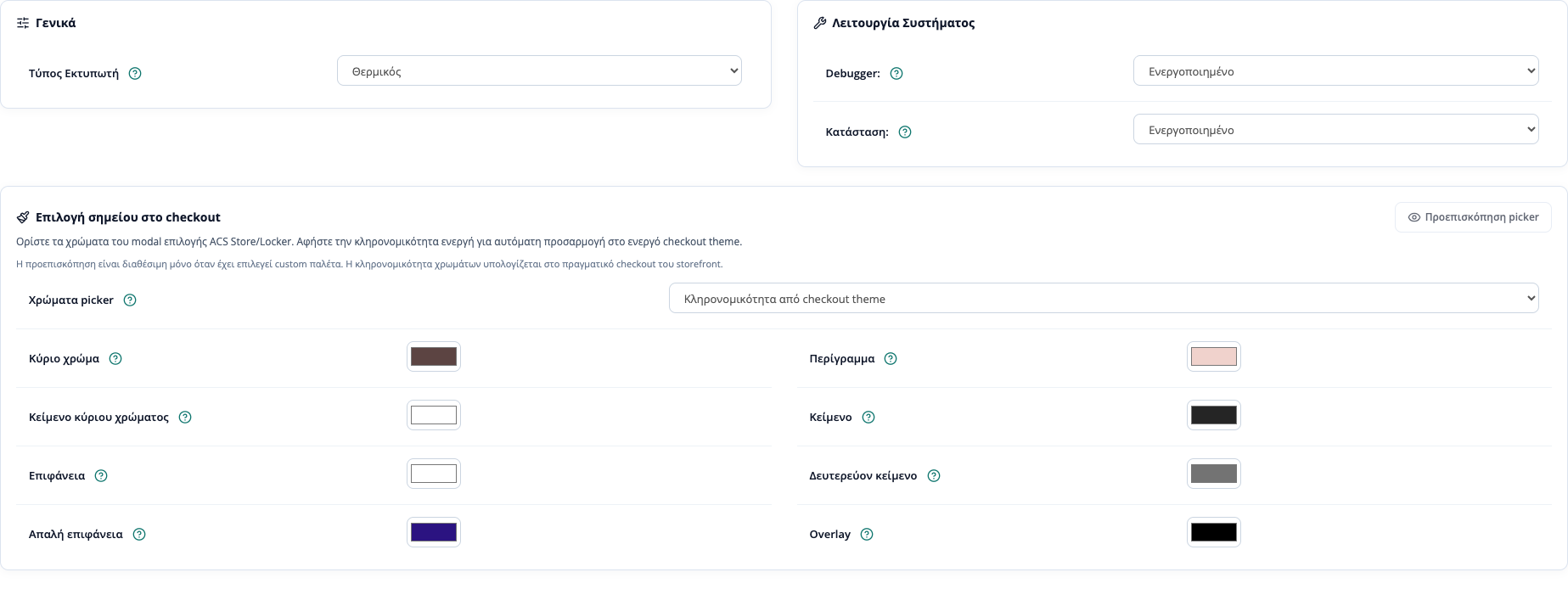
General settings: printer, geo zone, debugger, and checkout visibility.
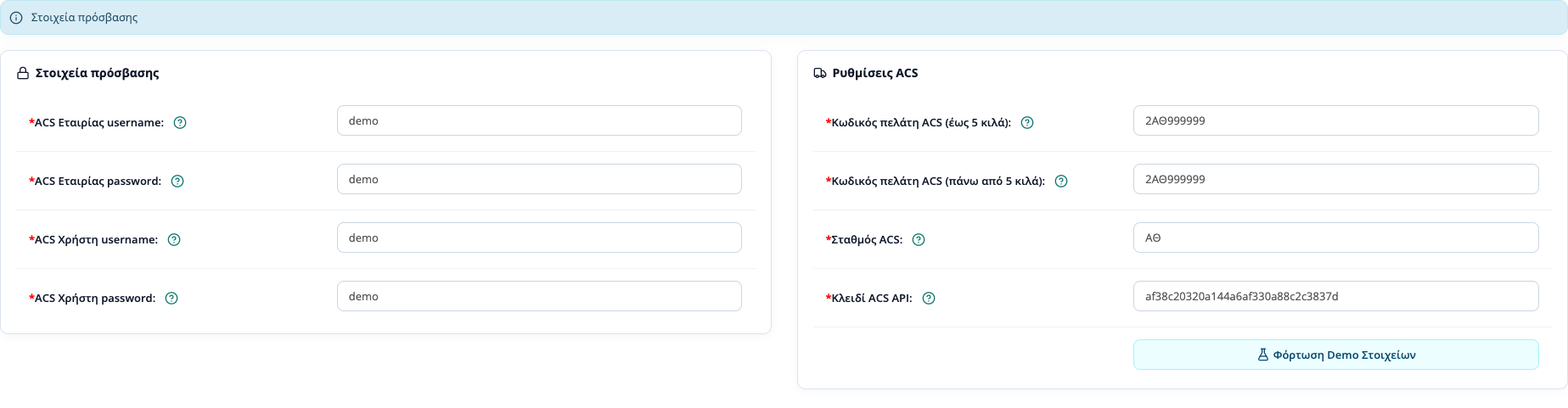
Connection details for ACS Web Services: company and user credentials, API key.
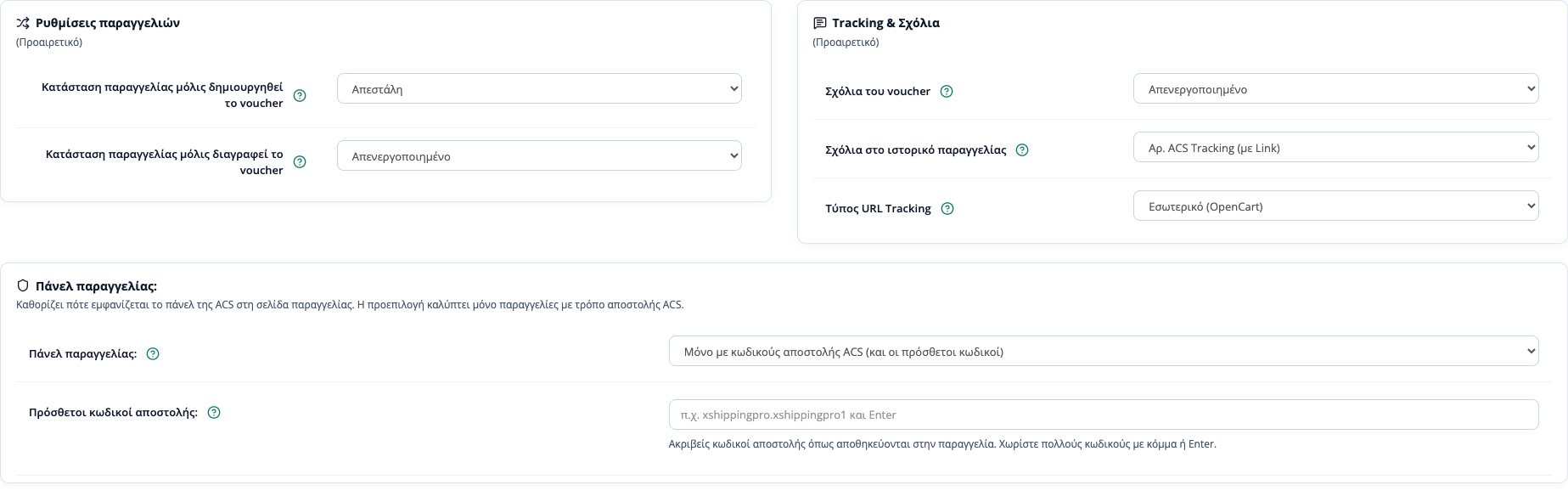
Order settings: voucher statuses, order history comments, and tracking URL type.
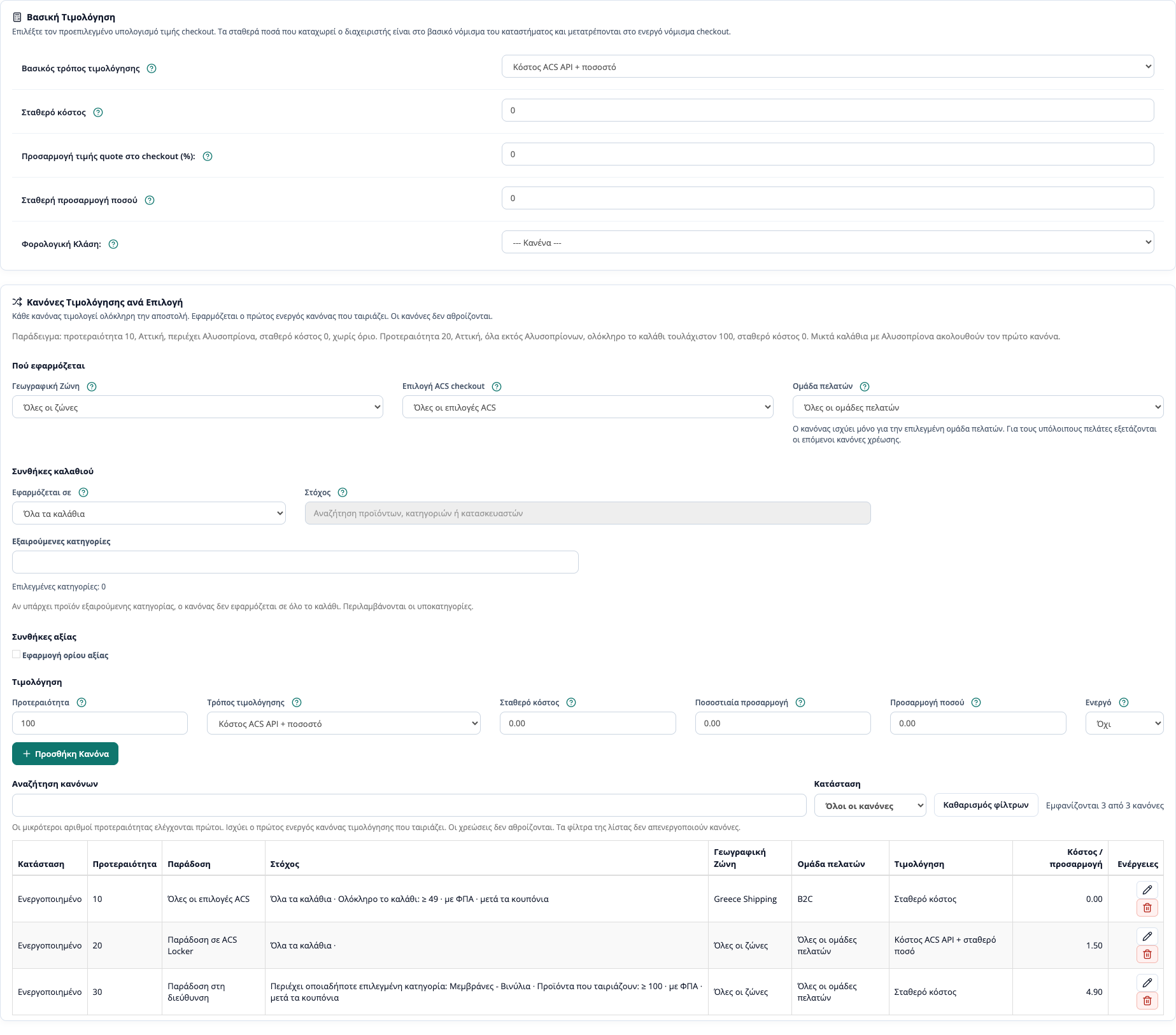
Pricing / Costs: base charge and rules per zone, customer group, cart value, and category.
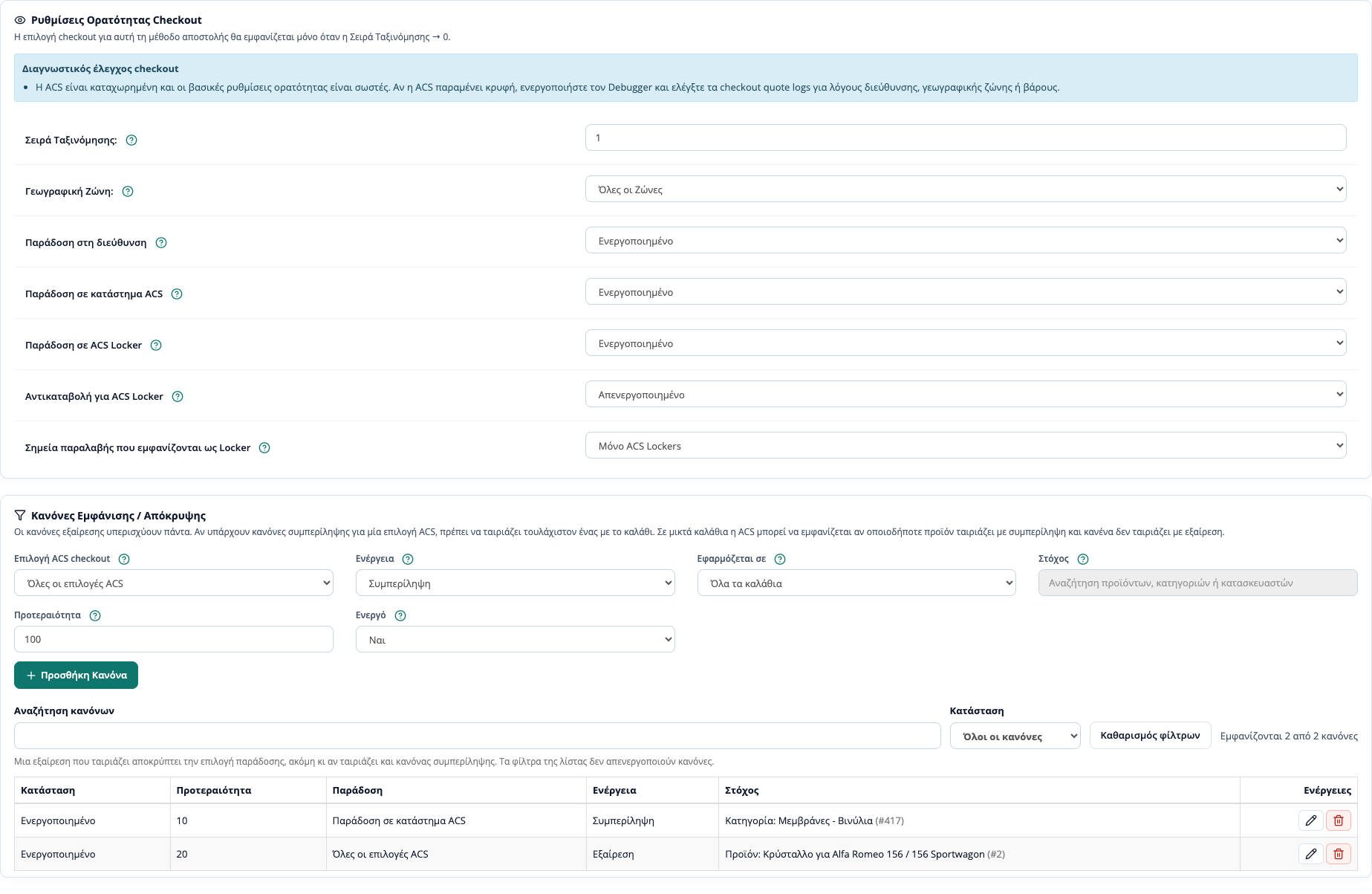
Visibility rules: include and exclude per product, category, or manufacturer for each ACS option.
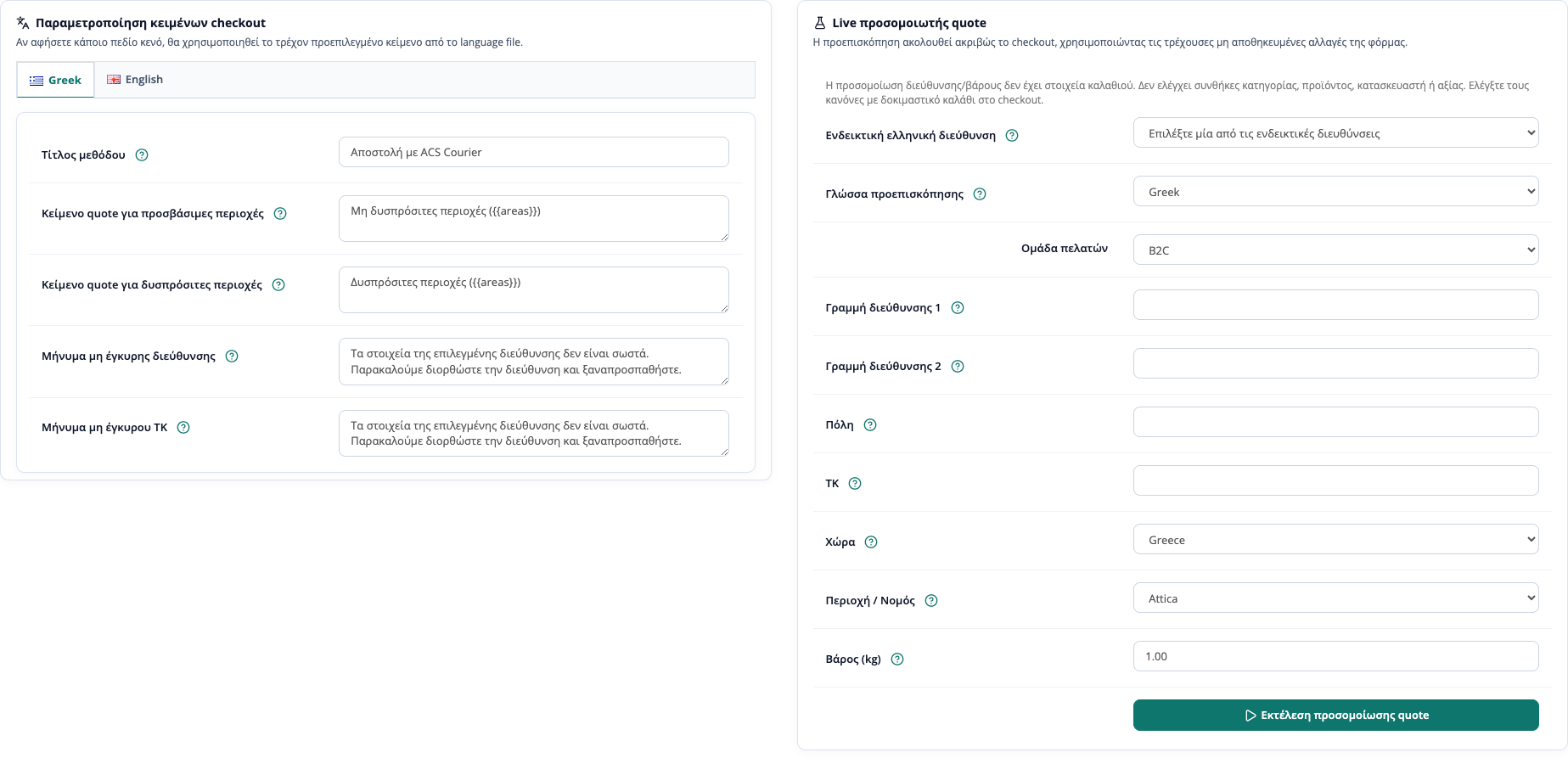
Checkout texts per language and the live quote simulator with sample addresses.

Voucher manager: search and check vouchers locally and through ACS.
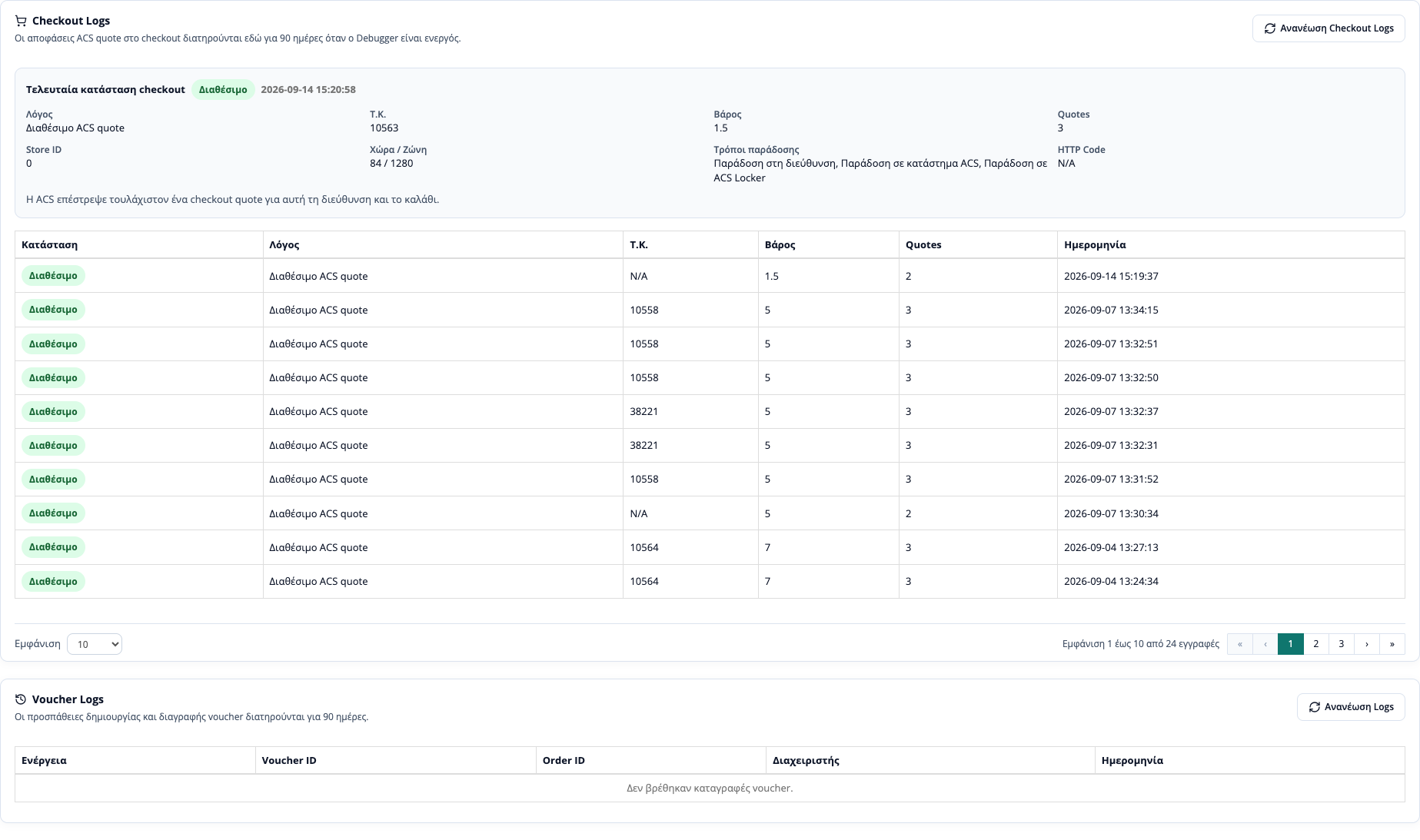
Logs: 90-day checkout logs and voucher logs for request checks.
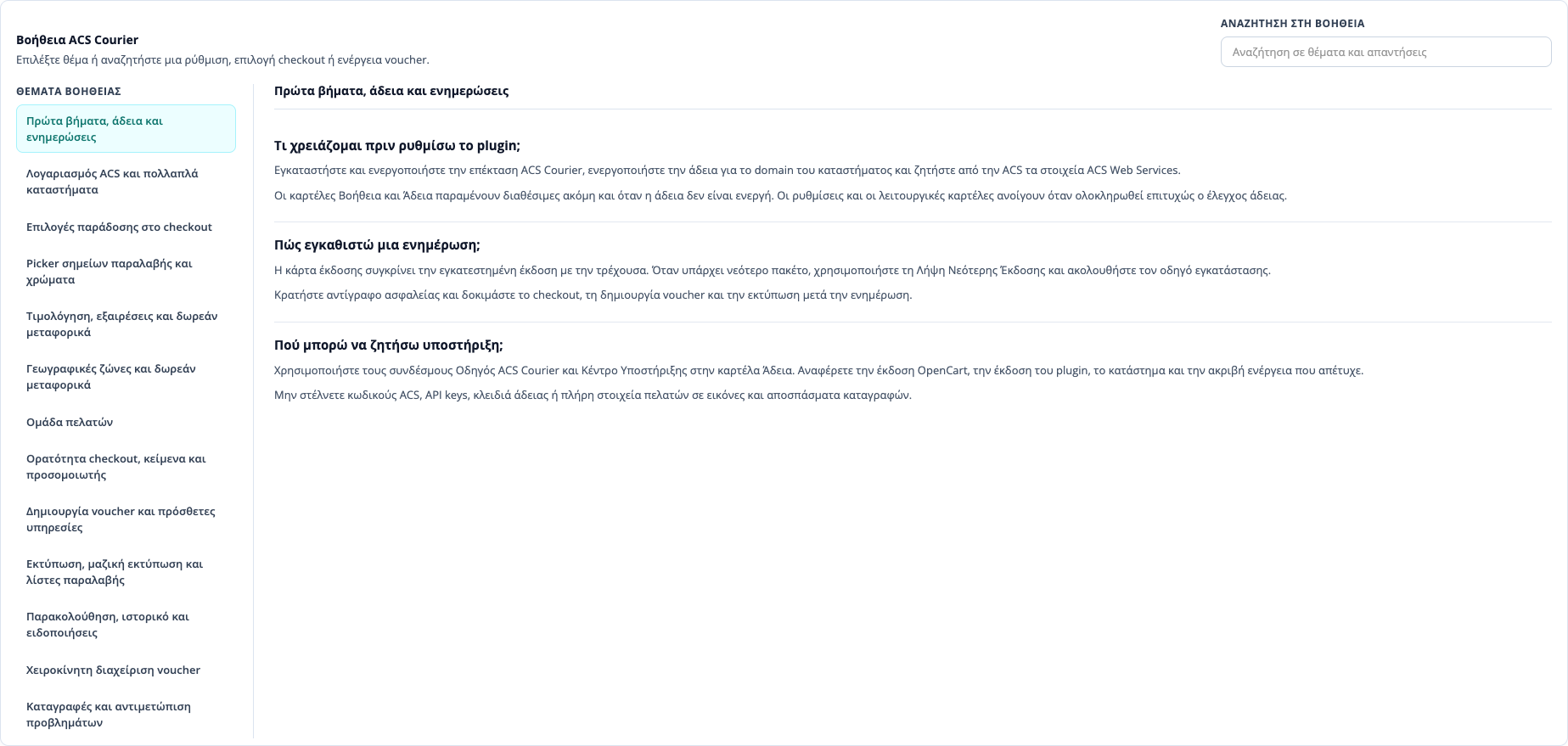
Help inside the admin: guides and search for settings, rules, vouchers, and printing.
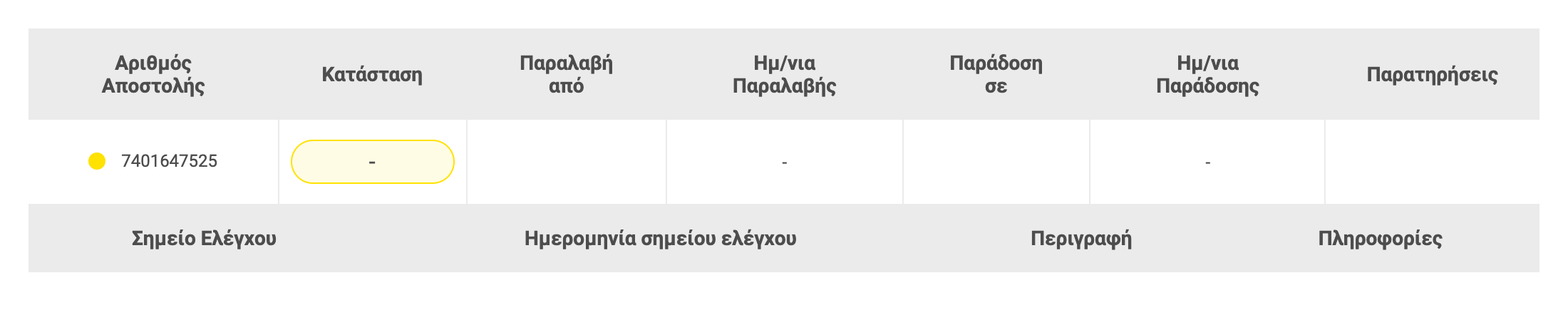
ACS shipment tracking inside OpenCart.
ACS workflow
When the ACS Courier plugin fits an OpenCart store
The ACS Courier plugin fits OpenCart stores that need vouchers, tracking, ACS Store / Locker or SmartPoint flows, and checkout rules without separate manual entry.
Pricing rules cover cost per delivery option, customer group, geo zone, and cart value, while visibility rules control when each ACS option appears. Decisions and API requests are logged in the admin for review.
Before launch, we check API credentials, areas, cash on delivery, cost logic, cart visibility, and test orders so the ACS workflow is reliable.
Frequently Asked Questions about the ACS Courier Plugin
How are ACS shipment vouchers created?
Vouchers are created from the OpenCart admin by using the order data and sending the request to ACS Web Services.
How does ACS shipment tracking work?
The plugin stores the ACS tracking number and helps update the order so the customer receives the correct tracking link.
Does it support ACS SmartPoint / Smart Point, ACS Store, and ACS Locker?
Yes. The plugin supports ACS SmartPoint / Smart Point, ACS Store, and ACS Locker flows depending on the available settings and checkout compatibility.
Can I set different ACS shipping costs per delivery option?
Yes. You can use ACS API cost, fixed cost, percentage adjustment, or fixed amount adjustment per ACS option and per rule.
Can ACS options appear only for specific products or categories?
Yes. Checkout Visibility Rules can target products, categories, manufacturers, or all carts, separately for each ACS delivery option.
What happens when both an include and an exclude rule match?
The exclude rule always wins. If include rules exist, at least one item must match and no item can match an exclude rule.
How do fixed amounts work in multi-currency checkout?
Fixed/admin amounts are treated as store base-currency values and converted automatically to the customer's checkout currency.
If a fixed fee appears before point selection, is ACS Store or Locker selection still required?
Yes. ACS Store or Locker selection is still required so the shipment can be created correctly, even when a fixed fee is shown first.
Is a database migration required for these rules?
No. These settings are stored in OpenCart settings, and the base plugin workflow remains available when no rules are configured.
What support is provided for the ACS Courier plugin?
We provide technical support for installation, ACS Web Services configuration, checkout testing, pricing rules, and daily plugin use.
Can I control cash on delivery for ACS Locker deliveries?
Yes. A setting allows or blocks cash on delivery when the customer selects ACS Locker. When blocked, the plugin clears any selected cash-on-delivery option for that choice only, without affecting other payment methods.
Are geo-zone and customer-group rules supported?
Yes. Each pricing rule can be limited to a geo zone, customer group, and delivery option. Guests use the checkout group or the store default group when no guest group is set.
Can I offer free shipping above a cart total?
Yes. You set the minimum and maximum cart value, whether the threshold includes VAT, and whether it applies after coupons, across the whole cart or the matching items.
How do I print several vouchers at once?
From the order list, select the orders and use bulk PDF printing, choosing the printer type and the label start position.
Are there logs and guides inside the admin?
Yes. The Logs tab keeps checkout logs for 90 days while the debugger is on, plus voucher logs. The Help tab covers settings, rules, vouchers, and printing with search.
Can I test the settings before applying them?
Yes. The live quote simulator in the checkout tab uses the unsaved form values and sample Greek addresses. It does not check cart conditions, so category or amount rules are confirmed with a test cart at checkout.
Ready to integrate ACS Courier into your OpenCart store?
Install the ACS Courier plugin and automate vouchers, tracking, ACS Store / Locker flows, and checkout rules for stores in Greece and Cyprus.